Industry Trends
|
||
|
Friday, August 16, 2013
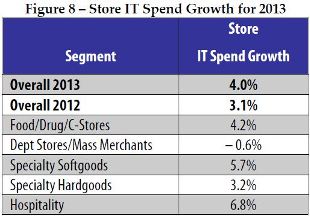
Industry Trend Report - Retail Store IT Spending

Upcoming Updates to NCR CounterPoint Mobile (CP Mobile)
Some information to pass along from NCR related to the next release of NCR CounterPoint Mobile (CP Mobile):
Upcoming NCR Counterpoint
Mobile Releases
|
|
|
Tuesday, August 13, 2013
Tuesday Tip - Setting Up "Walk-In" Customers (and why)
Most specialty retail stores track each customer individually. After all, we spend a lot of marketing
dollars to get someone in to our store for the first time – why not keep the
customer coming back?
Point of sale programs are great at tracking customer
purchase history and for generating sales and marketing reports to target that
top 20% of your customers that generate 80% of your stores revenue.
But what about the “one of” customer? This would be a
customer that is making a one time purchase and it is highly unlikely that they
will ever visit your store again. Or this could also be a customer that doesn’t
want to share any of their information with your store?
We already know that Microsoft RMS Store Operations and NCR
CounterPoint can be set to require selecting a customer for every transaction
mandatory, make selecting a customer for each transaction optional, or
selecting a customer for each transaction is not required.
You want your staff to be “in the habit” of always asking
for at least some basic customer information – if the staff knows that the
point of sale system is set to make selecting a customer for each transaction
optional or not required, then it is likely that they will skip the step
altogether.
The easiest way to make sure that everyone stays in the
habit of selecting a customer for each and every transaction is to set up a “Walk-In
Customer”. As you can see from the
screen shots below for both Microsoft RMS Store Operations and NCR
CounterPoint, this is a very easy way to include a customer for transactions
where the customer may be “one of” or was not interested in sharing any
personal information with your store.
Here is a basic "Walk-In Customer" in Microsoft RMS Store Operations:

And the same setup in NCR CounterPoint SQL:

(I probably should not have their credit limit set as "unlimited" - my error!)
Of note: depending on
your receipt settings – “Walk-In Customer” may or may not appear on the
receipt. You may want to check with your point of sale partner if this is a
concern to you.
Subscribe to:
Posts (Atom)